Persistent Asset Tagging, Copyright-Safe Set Generation, and Credit-Gated AI Video Pipelines
AI directors are streamlining commercial video workflows by tagging persistent character and location elements, using language models to synthesize copyright-safe environment prompts, and implementing pause-for-approval commands in agentic pipelines to prevent unmonitored credit burn.

Top learnings
Tag persistent character and location sheets as reusable Elements to maintain visual identity across scene generations without unanchored image uploads.
Ingest reference stills into Claude to synthesize clean Midjourney text prompts, avoiding copyright issues while preserving target set aesthetics.
Enforce explicit pause-for-approval constraints in agentic MCP prompts and upscale 480p draft passes to slash video credit consumption by over 50 percent.
How do persistent asset elements and empty set architecture prevent visual hallucinations?
When prompting multi-shot narrative sequences, relying on loose image uploads often causes character faces and environmental details to drift between takes. Creator Youri van Hofwegen demonstrates a structured solution inside Higgsfield AI by saving multi-angle character and location sheets as persistent tagged Elements (such as @glasshouse_woman). Referencing these tagged handle names directly inside prompt strings forces the video model to maintain facial geometry and wardrobe details across changing shot setups.
To prevent background environment corruption when placing actors inside scenes, van Hofwegen establishes clear spatial rules for location plates. When rendering empty interior locations, prompts must explicitly demand a clear, open floor space in the center of the frame. This open floor provides the downstream video diffusion model with unambiguous spatial geometry to anchor character placement and camera movement.
Additionally, van Hofwegen notes that prop reference sheets must deliberately exclude printed numbers, scale markings, or brand text. Diffusion engines frequently distort fine typography into unreadable glyphs during video synthesis. ReelStack suggests standardizing pre-production asset prep: tag locked sheets as persistent Elements, clear middle floor areas on location plates, and strip text markings from tool assets.

Read source excerpts 2
empty with a clear open space in the middle of the floor since that space is how the video model knows where to put the person later. Every room also gets one natural light
Youri van Hofwegen
description of her face and outfit and set the category to character. Then click create. And from now on, I can tag at glassous_woman in any prompt. and Higsfield brings back
Youri van Hofwegen
How can directors automate multi-market commercial localization without reshooting?
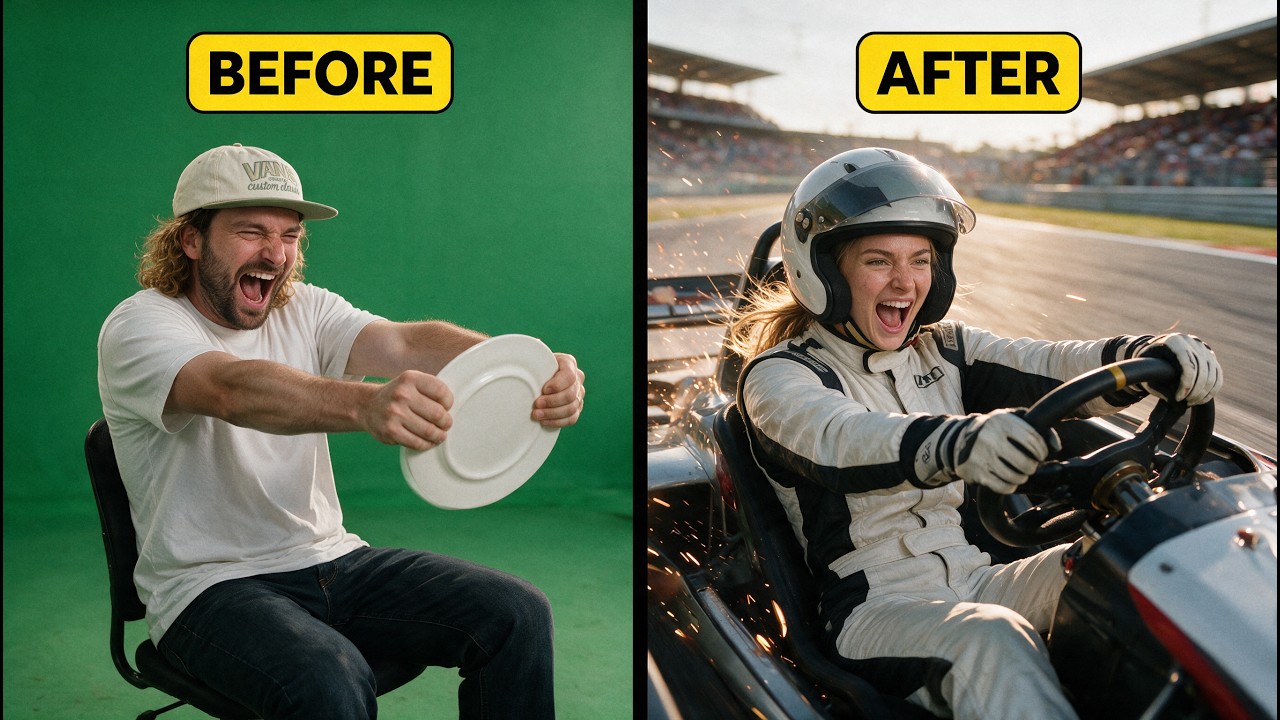
Scaling video ad campaigns across global markets typically requires costly reshoots with regional talent. Creator Rourke illustrates an automated alternative using Higgsfield Genjutsu. By taking a master video performance and pairing it with regional character reference sheets, directors can execute motion transfers that swap actor identities, wardrobe, and backgrounds while preserving original camera tracking, timing, and performance beats.
When establishing environment plates inspired by existing media, Rourke highlights the legal boundaries of visual references. Directly uploading copyrighted movie stills or commercial plates into generative pipelines creates copyright liabilities. To bypass this, Rourke feeds target reference stills into Claude to extract descriptive style prompts, which are then passed to Midjourney to generate original, legally compliant environment references.
ReelStack suggests leveraging motion transfer workflows for commercial A/B testing and localized ad variations. However, filmmakers must consider the financial trade-offs: motion transfer engines relying on premium models like Seedance 2.5 incur high credit costs per second, making low-cost draft testing essential before committing to full multi-market batch renders.
 Rourke
 Read source excerpts 2
example. We can upload the image that we've saved here into Claude and we can say, "Write me a Midjourney prompt inspired by the look and feel of this image." Then, Claude
Rourke
it will replace everything seamlessly into those scenes for you. You can then get Genji Jutsu to swap in those characters into the scenes, so it's the same take, same version,
Rourke
What control gates prevent credit burn in agentic MCP and automated video pipelines?
Orchestrating video productions through Model Context Protocol (MCP) links between reasoning agents like Claude and video platforms promises hands-free generation. However, autonomous pipelines frequently run unmonitored iteration loops that rapidly exhaust account credit balances on unwanted intermediate assets.
To maintain strict financial control, Youri van Hofwegen introduces an agentic prompt constraint: adding an explicit instruction telling the production agent to pause for creator approval after completing each step and forbid automated regenerations without permission. This operational gate allows directors to inspect intermediate storyboards, product plates, and motion previews before committing credits to final rendering passes.
Furthermore, van Hofwegen demonstrates a cost-saving rendering pipeline: generating initial motion tests in 480p mode (costing 15 credits instead of 80 credits per shot) and then passing approved takes through a dedicated upscaler model like Starlight Precise to output 1080p final video. ReelStack suggests adopting this draft-and-upscale protocol alongside agent approval gates to cut production credit burn by more than 50 percent without sacrificing final frame resolution.
Read source excerpts 2
original. then generate. The movement stays exactly the same. And with the upscale on top, each shot still costs less than half of what one 1080p generation would. Then I'll
Youri van Hofwegen
It tells the agent to pause for my approval after every step and never regenerate anything unless I ask, which means it never spends credits on a step I haven't checked. The
Youri van Hofwegen
What operational limits and physical artifacts constrain automated asset pipelines?
Despite structured asset prepping, AI video generation remains subject to mechanical limitations and physical logic breakdowns. When generating close-up shots of prop tools, van Hofwegen observes that video diffusion models often hallucinate unwanted engraved text or brand logos on close-ups if negative text constraints are not explicitly restated in the shot prompt.
Additionally, complex physical interactions—such as an actor using pruning shears to cut a flower stem—introduce high failure rates in two-handed manipulation. Directors must evaluate these high-risk physical interactions in low-cost 480p draft passes rather than assuming character sheets will prevent physical geometry glitches.
Furthermore, attempting to execute continuous style transitions (such as morphing a live actor into a clay figure mid-take) often results in costly generative artifacts. Van Hofwegen notes that executing an abrupt editorial cut directly to a stylized asset plate delivers a cleaner narrative impact on the first attempt while saving significant generation credits. ReelStack suggests substituting complex in-camera AI morphs with traditional editorial hard cuts.
 Youri van Hofwegen
 Read source excerpts 2
tend to get letters added up close, and that close-up was the one prompt where I never said the wrench had to stay completely plain. Make sure to put that in every prompt that
Youri van Hofwegen
pull off. Instead of paying for that transformation over and over, I'll just cut straight to the clay shot. It still gives you the surprise and works on the first try. That
Youri van Hofwegen
Key moments to explore
Optional deep divesWant to see a technique in action? Jump into the source videos. These AI-extracted timestamps may be approximate.
- 00:38 ↗Planning character details, prompts, and shot lists completely in Claude before generating images prevents credit-wasting rerolls.Youri van Hofwegen · STOP Wasting Credits & Master Perfect AI Videos in 13 Minutes
- 01:13 ↗Nano Banana 2.1 functions as a fast, low-cost image model suitable for rapid draft generations and general layout testing.Youri van Hofwegen · Learn 97% of Higgsfield AI in 14 Minutes
- 01:20 ↗Shoot source footage with a steady camera while keeping the subject's face clearly visible and holding props clearly in front of the camera.Rourke · How to Swap Anyone Into Any Video With Al (Higgsfield Genjutsu)
- 00:58 ↗Connecting Claude to Higgsfield via Model Context Protocol (MCP) enables seamless prompt and project orchestration inside a single chat window.Youri van Hofwegen · STOP Wasting Credits & Master Perfect AI Videos in 13 Minutes
- 02:08 ↗Using a photorealistic image model to create a multi-angle character sheet on a flat background provides reference visuals for downstream video models.Youri van Hofwegen · Learn 97% of Higgsfield AI in 14 Minutes
- 02:24 ↗Generate multi-angle character sheets showing front, side, back, and close-up views to provide visual reference for video replacement models.Rourke · How to Swap Anyone Into Any Video With Al (Higgsfield Genjutsu)
Put it into practice
Turn an AI film brief into a shot plan →Practical steps and checks before committing to production. Get the practical weekly briefing →The useful ideas in one email. Subscribe to keep learning. Need a filmmaker for your project? →Tell us what you want to make and submit a project brief.Go to the source
3 videos